


News On 6
4.6761.00 Reviews
App Specs
- Version
- 8.0.564
- Updated On
- License
- Free
- Downloads
- 100,000+
- Developer
- Griffin Media, L.L.C.
- Categories
- News & Magazines
- Platform
- Android
Screenshots
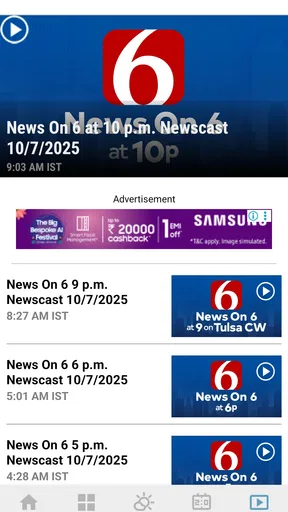
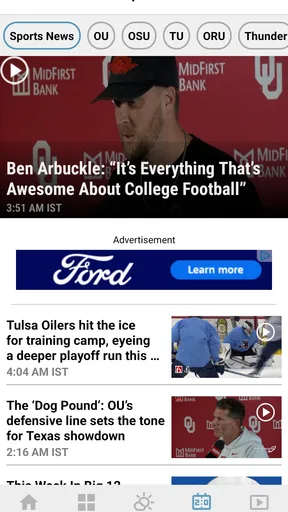


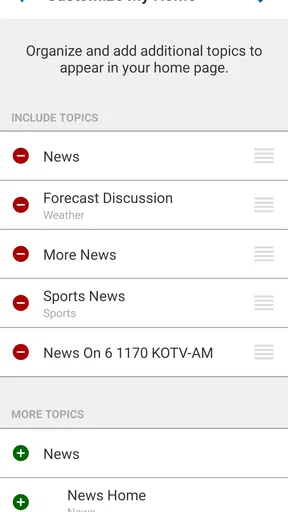
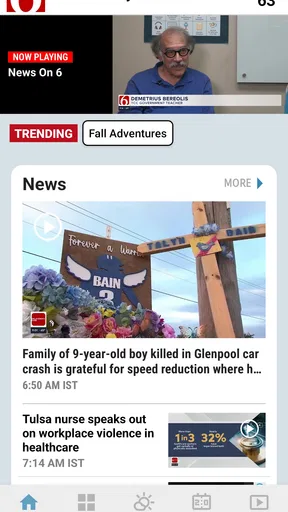
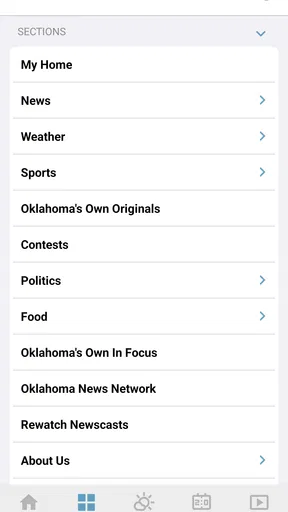

 Analysis by AppCompare
When I want a quick picture of what is happening across Oklahoma, I would rather open one focused local news app than sort through a national feed and hunt for nearby stories. News On 6 is built around that simple need, bringing news, weather, and sports into one mobile destination. After using it as a local information tool, I found its strongest quality is not sheer volume. It is the way a regional focus can make the first few minutes of checking the news more useful.
The app comes from Griffin Media, L.L.C., and sits in the News & Magazines category. It is free to use, carries an Everyone 10+ age rating, and supports devices running operating system version 9 or later. Its current version is 8.0.564, while its public release history reaches back to March 9, 2015. That long presence matters because this is not a brand-new experiment trying to imitate a news feed; it is an established local-news companion that has continued to receive updates.
Its reception is also encouraging. The app holds a 4.6 average from around 3.7 thousand ratings, with more than 761 written reviews, and it has passed 100 thousand installs. Those figures do not guarantee that every person will enjoy the layout or coverage, but they do suggest that many Oklahoma users find the app dependable enough to keep around.
Local focus turns a quick check into a useful routine
I find a local app most useful when it helps me turn a vague check-in into a deliberate one. With News On 6, I would use the Oklahoma focus to decide what deserves attention before moving on to weather or sports, rather than opening a broad feed and sorting through unrelated headlines. That small habit makes the next question—how the app fits into different mobile moments—easier to answer.
The capability that matters most
The central capability I kept returning to was the combination of Oklahoma news, weather, and sports in one place. That sounds straightforward, but it changes how I use the app. A general news application usually asks me to construct my own local experience by following regional sources, adjusting topics, and ignoring a large amount of unrelated national material. Here, the geographic focus does much of that sorting before I begin.
For a reader in Oklahoma, this means the app can act as a first stop rather than a complete replacement for every source. I can open it to see whether there is a local story worth following, check the weather before leaving home, and look for sports coverage without moving between several unrelated applications. The value is strongest when the question is not “What is happening everywhere?” but “What should I know about my area today?”
I also appreciate that news, weather, and sports serve different moments in the day. Local headlines are useful during a morning check, weather becomes more important before commuting or making plans, and sports may be the reason I return later. The three subjects give the app more staying power than a single-purpose headline reader, while the Oklahoma emphasis keeps the experience from feeling scattered.
Worth Reading Before You Choose

EA SPORTS FC Mobile 26 Is a Bigger Football Game, but It Takes Time

Flipboard Shows What News Apps Must Do Beyond the Feed

Switching to Android Auto Means Rethinking Your Driving Routine

Google Calendar Makes a Crowded Week Easier to Manage

Ludo King Makes the Most of the Minutes Between Plans

Baby Panda World Brings Quick Play to Modern Phones, but Its Game Library Feels Busy
That focus is also the main reason I would not recommend it as someone’s only news source. If your priority is international reporting, financial analysis, national politics, or a broad range of specialist topics, a large national publication or an aggregator will usually offer greater depth. News On 6 makes a different trade: less breadth in exchange for a more relevant local starting point.
What using it feels like in practice
My practical approach is to treat the app as a short briefing tool. I open it when I have a few minutes, scan the most relevant local items, then move to weather if I am about to travel or spend time outside. If a sports result or local event catches my attention, I can continue from there instead of beginning a separate search. This workflow is faster than manually checking several browser tabs, especially when I am not looking for a particular article.
The important distinction is between discovery and deep research. The app is well suited to discovering what deserves attention: a developing local situation, a weather concern, or an Oklahoma sports update. Once I need a detailed timeline, extensive background, or several independent perspectives, I prefer to continue reading across additional sources. That is not a failure of this app; it is the natural limit of a focused regional news product.
Because the app covers three related areas, I would not judge it only by how many headlines appear on the first screen. Its usefulness comes from reducing the number of decisions I have to make. I do not need to decide which local outlet to search first, which weather section is relevant, or where to look for a regional sports item. The app gives me a defined place to begin, which is particularly helpful when I am busy or only mildly curious.
A useful habit is to separate quick checking from deliberate reading. On a rushed morning, I use the app for orientation: what is new, what might affect my plans, and whether anything in the local sports or weather sections deserves attention. Later, if a story is important, I return to it with more time. This prevents the common mistake of treating a short news scan as if it were a complete understanding of a complicated event.
A realistic Oklahoma morning
Imagine leaving home for work while deciding whether to take the usual route or allow extra time. I would open the app before getting ready, scan the local news area for anything that could affect the morning, and then check the weather portion for conditions that might change how I travel. If I am following a local team, I can also see whether there is a result or update I missed the night before.
The benefit here is not that the app magically plans the day. It is that the three checks happen in one familiar place. I spend less time jumping between a national news app, a separate weather service, and a sports site. For someone who wants a local pulse before work, school, errands, or an evening event, that reduction in friction is more meaningful than a long list of extra sections.
There is another useful scenario during a developing local story. I might first notice the headline during a quick check, then return later as the situation changes. A regional app is a sensible place to monitor that kind of story because its editorial attention is aimed at Oklahoma rather than at whatever topic is attracting the most national clicks. I would still compare important information with official announcements or other reputable reporting, but the app can help me notice the issue early.
Where the convenience has limits
The same local concentration that makes the app efficient can feel narrow to someone who wants a full daily news diet. A reader who expects extensive world coverage, technology reporting, business commentary, or a large selection of opinion pieces may find the experience too regional. In that case, I would pair it with a broader news application instead of trying to force it into a role it was not designed to fill.
I would also avoid assuming that a headline scan is enough for serious decisions. Weather information can help with everyday planning, but major travel, emergency, health, or safety choices deserve careful attention to current official guidance. Likewise, a sports headline may tell me the result or main development without replacing a full report. The app works best as an accessible local doorway into information, not as permission to stop checking context.
Another trade-off is attention. Having news, weather, and sports together can encourage repeated checking, especially when I am waiting for a story to develop or following a team. I find it helpful to decide what I am opening the app for before I start. A quick weather check can easily turn into an extended headline session. That is not unique to this app, but the combination of subjects makes the temptation stronger.
Free access is a clear advantage, particularly for a reader who wants local information without adding another subscription. At the same time, free news applications are not always the best choice for people who want a highly customized reading environment or a publication built around long-form journalism. If I wanted carefully organized national coverage, investigative depth, or a personalized multi-source feed, I would look elsewhere and keep this app for Oklahoma-specific awareness.
Small habits that make the app more useful
My first tip is to use the app at predictable transition points rather than constantly refreshing it. Checking before leaving home, before an evening plan, or after a major local event gives the news a purpose. This makes the regional focus work for me instead of turning the app into background noise.
My second tip is to start with the question that matters most. If I am deciding what to wear or whether to change plans, I go directly to weather. If I want to understand the local conversation, I begin with news. If I am checking on a team or event, I use sports. This sounds obvious, but it prevents aimless scrolling and highlights the app’s real strength: putting three practical local needs under one roof.
My third tip is to use the first headline scan as a filter, not a conclusion. When a story affects my neighborhood, commute, school, or plans, I take the time to read beyond the initial summary and seek additional context when necessary. That approach gives me the speed of a mobile briefing without confusing speed with completeness.
A fourth useful trade-off is deciding whether local concentration or breadth matters more on a particular day. During a storm, local weather and news may be more valuable than a broad national feed. On a quiet weekend, I may prefer a magazine-style application with longer features. Thinking of News On 6 as a targeted tool makes the choice clearer and avoids disappointment.
Who will get the most from it
The best audience is someone who lives in Oklahoma, has a close connection to the state, or regularly needs a quick local update. Commuters can use it as part of a morning routine. Families may appreciate having local news and weather together before making plans. Sports followers can return for regional updates without searching through a national feed that gives their interests little space.
It can also suit people who are tired of configuring broad aggregators. Those services are powerful, but they often require time to follow sources, tune topics, and remove distractions. A focused local app makes a different promise through its structure: open it when you want Oklahoma information, then decide whether a particular item deserves deeper attention.
I would be more hesitant to recommend it to someone outside the state who wants a general news reader, or to a reader whose main interest is national and international reporting. It is also not my first choice for someone seeking a research archive, extensive analysis, or a fully personalized cross-publication feed. In those cases, a major newspaper application, specialist publication, or news aggregator may be a better primary tool.
Device compatibility is worth checking before installing. The app requires operating system version 9 or later, so it is accessible on many older devices but not on every phone or tablet still in use. Since it is free and rated Everyone 10+, the main decision is less about cost or age suitability and more about whether its Oklahoma-centered approach matches the way you consume news.
How it compares with familiar alternatives
Compared with a national news app, News On 6 feels more immediately relevant when the subject is local. A national service may offer more categories, more perspectives, and stronger tools for following worldwide events, but it can bury nearby information under a much larger stream. The regional focus here saves time when local awareness is the goal.
Compared with opening a mobile browser, the app offers a more direct routine. A browser is more flexible and lets me search any source, but that flexibility also creates extra steps. I have to remember which sites to visit and decide which headlines matter. The app is better when I want a familiar local starting point rather than an open-ended search.
Compared with a dedicated weather application, the weather side of this app may be more convenient for a quick local check, while a specialist weather tool could be preferable for people who want highly detailed forecasting tools or weather-specific customization. The same pattern applies to sports: the app is convenient for regional awareness, but a dedicated sports service may be stronger for deep statistics, extensive schedules, or broad league coverage.
That comparison explains my overall view. This is not trying to win every category at once. Its advantage is the connection between local news, weather, and sports. I can move among the subjects without losing the Oklahoma context, and that is more useful to me than having the largest possible content library when I only need a quick regional briefing.
My recommendation after regular use
I recommend News On 6 to Oklahoma readers who want a convenient local check-in and understand that convenience is its purpose. The free price removes an easy barrier, the long-running product history gives it a sense of continuity, and the strong average rating shows that it has found an audience. Most importantly, the app’s focused mix can turn a scattered morning search into a short, repeatable routine.
I would not install it as my only source for every kind of news. I would keep a broader source nearby for national and international coverage, and I would verify high-stakes information through appropriate official channels. Used that way, the limitations become manageable rather than frustrating.
My final judgment is that this is a practical regional news app rather than an all-purpose media universe. If your daily question is “What should I know about Oklahoma right now?”, it gives you a sensible place to start with news, weather, and sports together. If your question is “What is happening everywhere, with deep analysis on every subject?”, another option will serve you better. For the local reader, though, that narrower mission is exactly what makes the app worth keeping.
Pros
- Fast access to breaking news and local updates in Oklahoma.
- Useful weather forecasts
- alerts
- and live radar information.
- Live video streams help users follow developing stories.
- Push notifications can be customized for important news alerts.
- Simple layout makes headlines easy to scan on mobile devices.
Cons
- Coverage is mainly focused on the Tulsa and Oklahoma regions.
- Frequent notifications may feel excessive for some users.
- Some articles may include advertisements between content.
- Video playback can depend heavily on connection quality.
- Certain features may require location access or background permissions.
FAQs for News On 6
What is News On 6?
News On 6 is a local news application focused on delivering updates from News On 6 and the surrounding Oklahoma communities. After installing it, users can browse breaking news, local reports, weather information, sports coverage, videos, and other stories in one place. The app is especially useful for people who want quick access to regional headlines while away from a television or computer.
What type of content can I find in the News On 6 app?
The app typically includes a broad selection of local and regional content, such as breaking news, crime and public safety reports, weather forecasts, traffic information, sports, community stories, entertainment, and video segments. Coverage may vary depending on current events and your location. Users should also check the available sections and live updates regularly, since the newsroom can add or reorganize content over time.
Does News On 6 provide weather alerts and breaking news notifications?
News On 6 may send push notifications for breaking stories, severe weather, school or community updates, and other important local developments. During setup, the app can request permission to send alerts, and you can usually manage notification categories through the app or your device settings. If you prefer fewer interruptions, review these options carefully rather than disabling every alert automatically.
Is the News On 6 app free to download and use?
The News On 6 app is generally available as a free download for compatible Android and iOS devices. Most news content can normally be accessed without an upfront purchase, although the app may contain advertising, sponsored material, or links to external services. Mobile data charges can also apply when streaming videos or browsing outside Wi-Fi, depending on your carrier plan.
Does News On 6 require my location or personal information?
The app may request access to certain information, such as your approximate location, device notifications, or usage data, to personalize weather coverage, deliver relevant alerts, and improve performance. Location access is often optional, and you can deny or change it later in your phone’s privacy settings. Before downloading, review the current privacy policy and permissions listed in the official app store.


